Babel Image Gallery
This is an experimental project inspired by the Library Of Babel project, as well as the Universal Slide Show. The idea of exploring the space of all possible images is an interesting one, but the experience can frequently be frustrating, as finding anything worthwhile is statistically impossible, the space is simply too large. This project is an attempt to add some order to the chaos of searching through random images, by creating a way to order all possible images into a potentially interesting order.
The ordering defined in this project is designed to have a number of properties that I think are interesting, and make browsing the gallery a very strange experience. Due to performance and algorithmic limitations, the gallery is limited to only mono-chromatic images right now, and at the small resolution of 64x64 pixels. However, the benefit of real-time browsing I think is worth it!
Features of the ordering defined in this project:
- Images are ordered from darkest to lightest. Makes scrolling through the gallery a satisfying experience, as you can see the images get brighter as you scroll from start to end.
- Adjacent images differ usually only by 2 pixels, where one pixel has moved to a nearby location. Makes scrolling through the neighborhood of an image more satisfying, as each change only affects a small part of the image, retaining almost all of the existing content.
- The difference between two adjacent images is roughly uniformly distributed. Makes scrolling through the neighborhood of an image more satisfying, as the changes are not focused on just one part of the image but affects the image as a whole.
- Ability to convert freely between an image and the index it has in the sequence of all images. Useful for looking up the index of an image and exploring its neighborhood.
Finding new interesting images is still virtually impossible due to the size of the space, but I think exploring an ordered set of images helps give a little perspective on the scope of these things!
Fully open source at: https://github.com/Amarcolina/Babel
App Controls
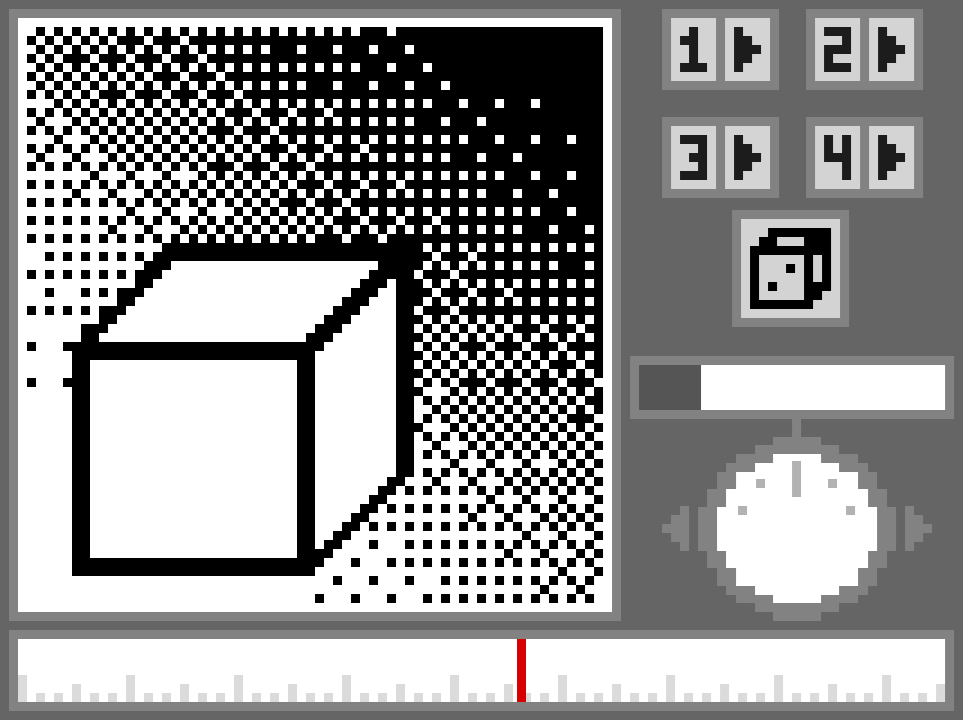
The app is driven entirely by the mouse, and has a number of different ways to interact:
- Click on the timeline at the bottom to seek to a specific point in the gallery. Darkest images are on the left and brightest images are on the right.
- Click and drag on the dial to explore the neighborhood of the current image, traveling forwards or backwards along the timeline.
- Click and drag on the slider above the dial to increase the dial strength, allowing you to explore farther. At the maximum dial strength, each notch sends you 10,000,000,000 images forward!
- Click on a preset to load that image into the gallery.
- Click on the Play button next to a preset to animate from the current image to the preset image over time.
- Click on the canvas itself to set or clear pixels, which adjusts the timeline to the newly created image, which you can further explore from there.
Leave a comment
Log in with itch.io to leave a comment.